Recently, I bought a GM Tehc2 SCANNER from CARTOOLDEAL website.The package come with GM 33.004 software (32MB Memory Card for GM tech2 ) and I found the radio vin relearn option.
Now , I use GM TECH2 everyday at work. Tech 2 (and Tech2Win) for VIN relearn in radios on GM's. Before turning the tool, you can get instructions on the CD.
Here is the step-by-step instruction on clear radio theftlock for GM (GM, SAAB, OPEL, SUZUKI, ISUZU and HOLDEN) models with GM Tech2 Scan Tool.
Well setup CANDI module with GM Tech 2 main unit, connect Tech2 scanner with vehicle.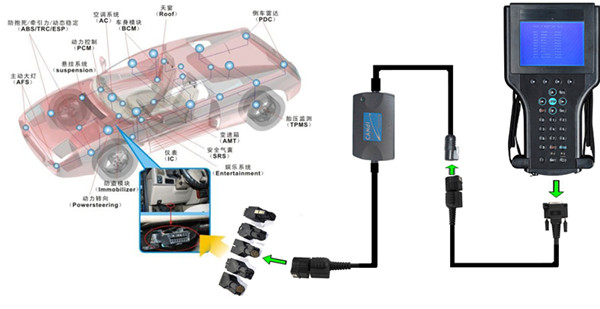
GM Tech 2 Theft-lock startup procedure:
1.Select “Diagnostics” at the Main Menu screen
2.At the “Vehicle Identification” screen, select the following options:
– Model Year >>> (radio came from an 04 Escalade or whatever)
–LD Trk, MPV, Incomplete;
3. Select “Body” at the “System Selection” Menu screen
4. At the “Vehicle Identification” screen, select the following:
– Appropriate model
– Appropriate Air Conditioning
– Navigation Radio
5. Select “Navigation Radio” at the “Body” screen
6. Select “Special Functions” at the “Radio” screen
7. Select “VIN Relearn” at the “Special Functions” screen
8. At the “VIN Relearn” screen, the Tech2 will display “Do you want to clear radio theft information?”
9. To begin clearing, press the soft touch key on the top right of the scan tool. The scan tool will display “Clearing Radio Theft in Progress.”
10. Press “EXIT” on the scan tool and cycle the ignition.
NOTE:
1.The radio theft will learn the VIN. Without learning the VIN, the radio will display a locked message (LOC or LOCKED).
2.Another way is to see if the sound works by installing the radio, and not turning the key to ON, just ACC. that will work the radio for a test.
This is not a tech2 option/feature for latest model GM. if your vehicle is prior to 2008 this option is done with the tis2000 software most likely included in the purchase of the china tech2 clone.
if the tis2000 software is not available or your vehicle is 2008 or newer then you need to purchase a subscription with gm tisweb at acdelcotds.com for usa and Canada or global tis for the rest of the world I believe. the sub is 55 usd for 2 days.
You did not specify the Year/Make/Model you are working on, but sometimes VIN write for radio will not show up if incorrect radio is selected during vehicle communications.
Generally it is under BODY -> (appropriate) RADIO -> SPECIAL FUNCTIONS -> VIN Relearn
Some newer CAN vehicles have it under the vehicle systems -> module setup -> Radio
If option is not available recheck RPO codes/radio type and make sure it is selected correctly.
TIS2000 software is not required for any GM module setup if you own a GM Tech 2 scan tool.
If you have never flash a gm vehicle I will recommend you to watch some videos on youtube so at least you have an idea of how is done.
With our financial upheaval in America now, older vehicles are a treasure and the clone GM Tech2 scanner might see an increase in sales as people resort to their own repairs and diagnosis. Hope this article may help you and Best of luck to you in the future.