Looking for the best OBD2 scanner or car diagnostic tool? Our comprehensive guide covers top-rated code readers, how they work, key features, and buying tips for DIY users.
Modern vehicles rely on complex computer systems to monitor performance, emissions, and engine health. When something goes wrong, your car’s onboard diagnostics (OBD) system generates error codes. An OBD2 scanner (also called a code reader or car diagnostic scanner) helps you read these codes, diagnose issues, and even reset warning lights.
Whether you're a DIY mechanic or just want to save money on repairs, choosing the right car scanner is essential. This guide will explain:
How OBD2 scanners work
Different types of car diagnostic tools
Key features to look for
Top-rated models for home use
FAQs about car diagnostics
An OBD2 scanner is a device that connects to your car’s OBD-II port (usually under the dashboard) to retrieve diagnostic trouble codes (DTCs). These codes help identify engine, transmission, ABS, and emissions-related problems.
Why Use a Car Diagnostic Scanner?
Save money on mechanic fees – Diagnose issues yourself before visiting a shop.
Fix check engine lights – Understand why the warning light is on and clear it.
Monitor real-time data – Check fuel efficiency, engine temperature, and sensor readings.
Pass emissions tests – Identify and fix problems that could cause a failed inspection.
Types of OBD2 Scanners
Not all car scanners are the same. Here are the main types:
1. Basic Code Readers
Best for: Beginners, quick code checks
Features: Reads and clears engine codes, no advanced diagnostics
Price: $20 – $50
2. Bluetooth/Wi-Fi OBD2 Scanners
Best for: Smartphone users, real-time data tracking
Features: Pairs with apps (like Torque Pro), live sensor data, fuel economy tracking
Price: $30 – $100
3. Advanced Diagnostic Scanners
Best for: DIY mechanics, full-system scans
Features: ABS, SRS (airbag), transmission codes, oil reset, battery tests
Price: $100 – $500
4. Professional-Grade Scan Tools
Best for: Mechanics, advanced diagnostics
Features: Bi-directional control, ECU programming, full vehicle coverage
Price: $500+
Key Features to Look for in a Car Scanner
When shopping for an OBD2 diagnostic tool, consider these factors:
1. Compatibility
Ensure it works with your car’s make, model, and year (most support OBD2 vehicles from 1996+).
2. Live Data Streaming
Monitors real-time engine parameters (RPM, fuel trim, oxygen sensors).
3. Code Definitions
Explains error codes in plain language (not just “P0420” but “Catalyst System Efficiency Below Threshold”).
4. ABS & Airbag Scanning
Higher-end models read codes beyond the engine (brakes, airbags, transmission).
5. Smartphone Connectivity
Bluetooth/Wi-Fi scanners work with apps for enhanced functionality.
6. Battery & Alternator Testing
Some scanners check charging system health.
7. Software Updates
Ensures compatibility with newer car models.
1. BlueDriver Bluetooth Pro OBD2 Scanner
Best for: iPhone & Android users
Features: Full diagnostics, repair reports, ABS/SRS scanning
Price: ~$100
2. Autel AutoLink AL319
Best for: Basic code reading
Features: Reads/clears codes, checks emissions, compact design
Price: ~$30
3. FIXD OBD2 Scanner
Best for: Beginners
Features: Simple app interface, maintenance reminders
Price: ~$60
4. ANCEL AD310 Classic Scanner
Best for: Budget-friendly diagnostics
Features: Reads/erases codes, freeze frame data, DTC lookup
Price: ~$50
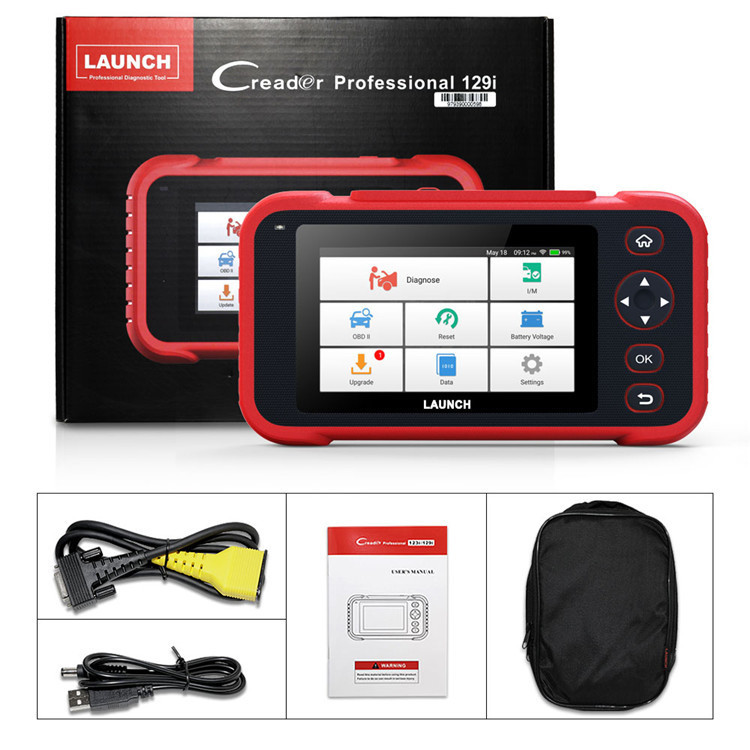
5. Launch CRP129 OBD2 Scanner
Best for: Advanced DIYers
Features: Full-system scans, oil reset, battery test
Price: ~$300
How to Use an OBD2 Scanner
Locate the OBD2 port (usually under the dashboard near the steering wheel).
Plug in the scanner and turn on the ignition (don’t start the engine).
Follow the prompts to read codes.
Look up the codes in the manual or online.
Fix the issue or take the car to a mechanic.
Clear the codes (if applicable) and see if the problem returns.
Frequently Asked Questions (FAQs)
Q: Can an OBD2 scanner fix my car?
A: It can’t fix issues but helps diagnose them so you or a mechanic can make repairs.
Q: Will a code reader work on any car?
A: Most work on OBD2-compliant vehicles (1996 and newer in the US). Some may not support European or Asian models.
Q: What’s the difference between OBD2 and CAN?
A: CAN (Controller Area Network) is a faster communication protocol used in newer cars (2008+). Most modern scanners support both.
Q: Can I use my phone as an OBD2 scanner?
A: Yes, with a Bluetooth OBD2 adapter and an app like Torque Pro or Car Scanner.
Q: Why is my scanner not connecting?
A: Check if the ignition is on, the port is clean, and the scanner is compatible.
Final Thoughts
An OBD2 scanner is a must-have tool for car owners who want to save money on diagnostics and understand their vehicle’s health. Whether you need a basic code reader or an advanced diagnostic scanner, there’s a model for every budget and skill level.
For most DIY users, a Bluetooth scanner like BlueDriver or a budget-friendly Autel AL319 is a great choice. If you need ABS or transmission codes, consider a mid-range scanner like the Launch CRP129.
Investing in a car diagnostic tool empowers you to take control of your vehicle’s maintenance and avoid costly mechanic visits.