Discover the NEXIQ USB Link 2, the best heavy-duty truck diagnostic tool for professional mechanics. Learn about its features, NEXIQ software, compatibility, and why it’s a top choice for truck diagnostic software.
In the world of heavy-duty truck diagnostics, having the right tool is crucial for efficient troubleshooting and repairs. The NEXIQ USB Link 2 stands out as one of the best truck diagnostic tools, offering advanced capabilities for mechanics and fleet managers. This article explores its features, software compatibility, and why it’s a top choice for professionals.
What is the NEXIQ USB Link 2?
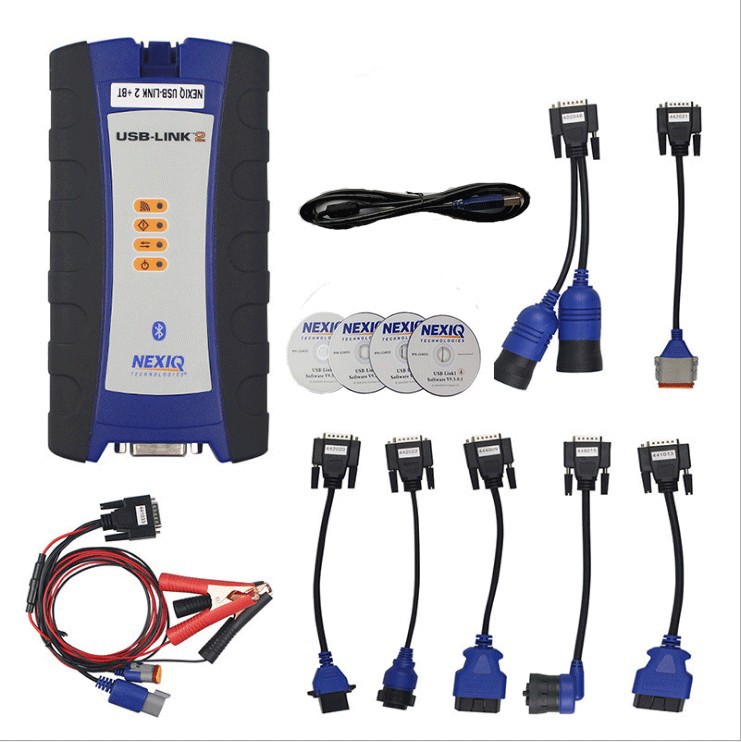
The NEXIQ USB Link 2 is a
heavy-duty truck diagnostic tool designed to interface with commercial vehicles, including trucks, buses, and construction equipment. It connects via USB to a PC or laptop, allowing mechanics to run truck diagnostic software for troubleshooting, code reading, and system analysis.
Manufactured by NEXIQ, a leader in vehicle diagnostics, this tool is widely used in repair shops and fleet maintenance operations.
Key Features of the NEXIQ USB Link 2
1. Broad Vehicle Compatibility
The NEXIQ USB Link 2 supports a wide range of heavy-duty truck brands, including:
Freightliner
Kenworth
Peterbilt
Volvo
Mack
International
Detroit Diesel
Cummins
This makes it one of the most versatile truck diagnostic tools available.
2. Advanced Diagnostic Capabilities
Read and clear fault codes (DTCs)
View live data streams (engine RPM, fuel pressure, temperatures)
Perform ECM programming (with proper software licensing)
Conduct bi-directional tests (actuator control)
3. High-Speed USB Connectivity
Unlike older Bluetooth or wireless adapters, the USB Link 2 ensures stable, high-speed communication with vehicle ECUs, reducing lag and connection drops.
4. Works with Leading NEXIQ Software
The device pairs with NEXIQ diagnostic software, including:
ServiceMaxx (for Detroit Diesel, Freightliner, Western Star)
ProLink Ultra (for Cummins, PACCAR, Volvo, and more)
eTechnician (for Caterpillar engines)
This makes it a powerful truck diagnostic software solution.
5. Rugged and Reliable Design
Built for professional shop environments, the NEXIQ USB Link 2 features a durable casing and a long-lasting USB cable.
NEXIQ USB Link 2 vs. Other Truck Diagnostic Tools
| Feature |
NEXIQ USB Link 2 |
Competitor A |
Competitor B |
| Vehicle Coverage |
Heavy-duty trucks & buses |
Limited to certain brands |
Mostly light-duty vehicles |
| Connection Type |
USB (stable) |
Bluetooth (unreliable) |
Wireless (slow) |
| Software Support |
NEXIQ software, third-party apps |
Proprietary only |
Limited compatibility |
| Programming Capability |
Yes (with license) |
No |
Partial |
| Price |
Mid-range |
Expensive |
Budget (but limited) |
The NEXIQ USB Link 2 offers the best balance of performance, compatibility, and reliability, making it the best heavy-duty truck diagnostic tool for professionals.
How to Use the NEXIQ USB Link 2
Step 1: Install the Software
Download and install NEXIQ-compatible software (e.g., ServiceMaxx, ProLink Ultra).
Install the USB drivers for the device.
Step 2: Connect to the Vehicle
Plug the NEXIQ USB Link 2 into your PC.
Connect the diagnostic cable to the truck’s OBD-II or J1939 port.
Step 3: Run Diagnostics
Read fault codes
Monitor live data
Perform advanced functions (if licensed)
Why Choose NEXIQ USB Link 2 Over NEXIQ 1?
The NEXIQ USB Link 2 is an upgraded version of the original NEXIQ USB Link, with:
✔ Faster data transfer
✔ Improved compatibility with newer truck models
✔ Better software integration
While the NEXIQ 1 is still functional, the USB Link 2 is the recommended choice for modern diagnostics.
Best NEXIQ Software for Truck Diagnostics
To maximize the NEXIQ USB Link 2, use these truck diagnostic software options:
1. ServiceMaxx
Best for Detroit Diesel, Freightliner, Western Star
Features: Fault code reading, parameter adjustments, ECM programming
2. ProLink Ultra
Supports Cummins, PACCAR, Volvo, Mack
Includes advanced troubleshooting tools
3. eTechnician (for Caterpillar Engines)
Specialized for Cat engines
Provides detailed engine diagnostics
Frequently Asked Questions (FAQs)
Q1: Is the NEXIQ USB Link 2 compatible with all trucks?
A: It works with most heavy-duty trucks (J1939 & OBD-II), but always check compatibility with your specific model.
Q2: Can I use third-party software with the NEXIQ USB Link 2?
A: Yes, some third-party diagnostic tools support it, but NEXIQ software is recommended for full functionality.
Q3: Does the NEXIQ USB Link 2 support engine programming?
A: Yes, but you need proper licensing (e.g., Detroit Diesel or Cummins Insite).
Q4: Is the NEXIQ 2 better than Bluetooth scanners?
A: Yes! USB provides faster, more stable connections than Bluetooth, which can lag or disconnect.
Conclusion
The NEXIQ USB Link 2 remains one of the best heavy-duty truck diagnostic tools on the market, offering broad compatibility, fast USB connectivity, and powerful software support. Whether you're a mechanic, fleet manager, or truck owner, this tool provides professional-grade diagnostics for efficient repairs.
For the best results, pair it with NEXIQ software like ServiceMaxx or ProLink Ultra to unlock its full potential.
Final Thoughts
If you're searching for a reliable truck diagnostic tool, the NEXIQ USB Link 2 is a top-tier choice. Its performance, durability, and software integration make it a must-have for commercial vehicle diagnostics.
Ready to upgrade your diagnostics? Get the NEXIQ USB Link 2 today!