The GM Tech 2 works best with GM, Chevrolet, Cadillac, Buick, GMC, Hummer, Saturn, and Pontiac vehicles from 1992–2013. Some functions may work on 2014+ models, but newer tools (like GDS2 + MDI) are recommended. Learn how to use the GM Tech 2 scan tool for diagnostics, reprogramming, and troubleshooting GM vehicles.
The
GM Tech 2 is one of the most powerful factory scan tools for General Motors (GM) vehicles, offering advanced diagnostics, module programming, and system troubleshooting. Whether you're a professional mechanic or a DIY enthusiast, understanding how to use the GM Tech 2 can save time and money on repairs.
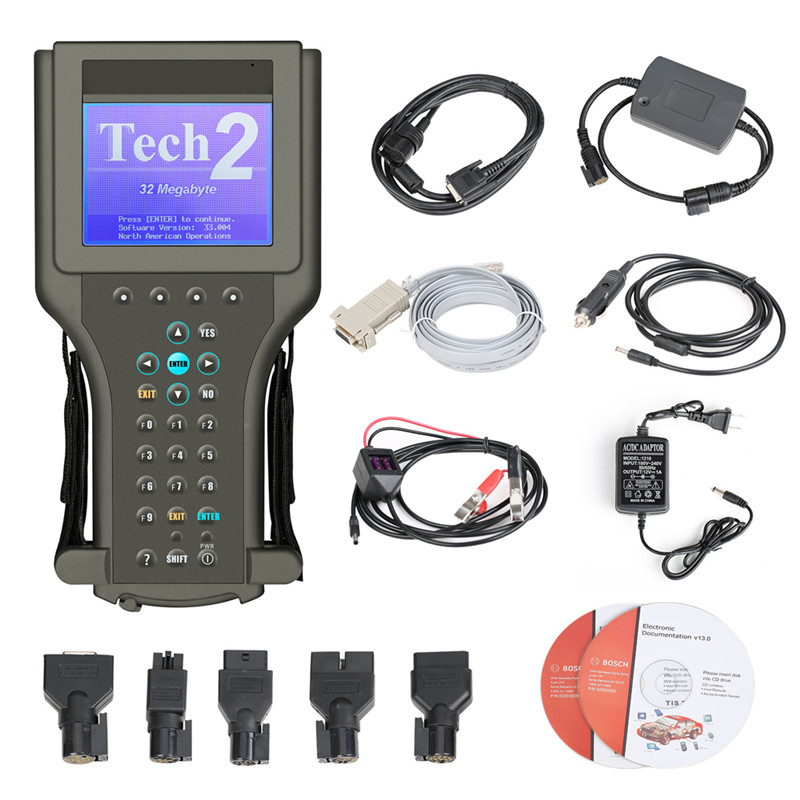
In this guide, we’ll cover:
✔ What the GM Tech 2 is and what it can do
✔ Key features and compatible vehicles
✔ How to use it for diagnostics & reprogramming
✔ Alternatives & upgrades (
GM MDI , Tech 2Win )
✔ Common issues & troubleshooting tips
The GM Tech 2 is a professional-grade diagnostic tool developed by General Motors for dealerships and independent repair shops. It provides:
Full-system diagnostics (engine, transmission, ABS, airbags, etc.)
PCM/ECM reprogramming (for older GM vehicles)
Live data streaming & actuator tests
Key & immobilizer programming
GM tech2 Compatible Vehicles
The GM Tech 2 works best with GM, Chevrolet, Cadillac, Buick, GMC, Hummer, Saturn, and Pontiac vehicles from 1992–2013. Some functions may work on 2014+ models, but newer tools (like GDS2 + MDI) are recommended.
Key Features of the GM Tech 2
| Feature |
Description |
| Diagnostics |
Reads & clears trouble codes (DTCs) for all modules |
| Live Data |
Monitors sensor readings in real-time |
| Bi-Directional Controls |
Tests actuators (fuel pump, ABS, etc.) |
| Reprogramming |
Updates PCM, TCM, BCM, and other modules |
| Security Functions |
Resets theft deterrent, programs keys & fobs |
| J2534 Pass-Thru Support |
Allows reflashing via TIS2Web (with adapter) |
How to Use the GM Tech 2 for Diagnostics & Reprogramming
1. Basic GM Diagnostics (Reading & Clearing Codes)
Connect the Tech 2 to the OBD-II port (ignition ON, engine OFF).
Select:
Diagnostics → Year → Make → Model → System (PCM, ABS, etc.)
Choose "Diagnostic Trouble Codes (DTCs)" to view or erase codes.
2. Reprogramming a PCM (ECM)
Log in to TIS2Web (GM’s Techline service) for the latest calibration file.
Connect the Tech 2 and select "Reprogram PCM".
Follow prompts to load the new file (ensure stable power supply).
Cycle ignition and perform relearn procedures (idle, throttle, etc.).
(For a detailed step-by-step, check our GM PCM Reprogramming Guide.)
GM Tech 2 Alternatives & Upgrades
Since the Tech 2 is discontinued, GM now uses:
GM MDI (Mobile Diagnostic Interface) + GDS2 (for 2010+ vehicles)
Tech 2Win (software emulator, requires J-2534)
Autel MaxiSys, Snap-On Solus, or Launch X431 (aftermarket options)
Common GM Tech 2 Issues & Fixes
| Problem |
Solution |
| No Power / Won’t Turn On |
Check battery, replace if dead |
| "No Communication" Errors |
Verify OBD-II connection, check fuse |
| Reprogramming Fails |
Use a battery charger (12V+), retry |
| Outdated Software |
Update via TIS2000 or Tech2Win |
Is the GM Tech 2 Still Worth It?
Best for pre-2013 GM vehicles (full diagnostics & programming).
Limited for newer models (requires MDI or J2534 passthrough).
For DIY mechanics, a used Tech 2 is a great investment, but professionals should consider GM MDI/GDS2 for newer cars.



