Discover everything about the GM Tech 2 Scanner—the industry-standard diagnostic tool for GM vehicles. Learn about its key features, compatibility (including 1996 GMC Sierra and 2007 Chevy Trailblazer), brake bleeding procedures, HVAC actuator calibration, and CANdi module functions. Find out where to buy a Tech 2 scanner (like Cartooldeal.com), whether it requires a subscription, and explore cost-effective alternatives.
Introduction to the GM Tech 2 Scanner
The GM Tech 2 is a professional-grade OBD1/OBD2 diagnostic scanner designed specifically for General Motors (GM) vehicles from 1992 to 2013. It remains one of the most powerful tools for reading and clearing trouble codes, performing system resets, and running advanced diagnostics on GM, Chevrolet, GMC, Cadillac, and Saturn models.
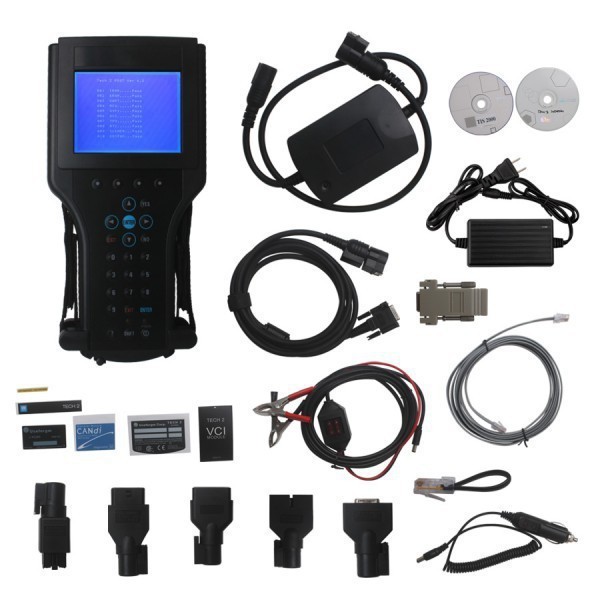
This guide will cover:
✔ GM Tech 2 Scanner Equivalent – Are there cheaper alternatives?
✔ Does GM Tech 2 Require a Subscription? – Ongoing costs explained.
✔ GM Tech 2 User Guide – How to use it effectively.
✔ Where to Buy a Tech 2 Scanner – Trusted sources like Cartooldeal.com.
✔ What is the Tech 2 CANdi Module For? – Enhanced diagnostics explained.
✔ Does the Tech 2 Support Auto Brake Bleeding? – ABS pump activation guide.
✔ Compatibility with Older GM Models (1996 GMC Sierra, 2007 Chevy Trailblazer, etc.)
1. GM Tech 2 Scanner Equivalent: Are There Cheaper Alternatives?
While the GM Tech 2 is the best choice, several alternatives offer similar functionality:
Best Tech 2 Scanner Alternatives:
VXDIAG VCX Nano – Works with GM GDS2 software for newer models.
OBDLink MX+ – Good for basic OBD2 diagnostics but lacks proprietary GM functions.
Autel MaxiCOM MK808 – Advanced bi-directional controls but not GM-specific.
Launch X431 PRO – Supports multiple brands, including some GM functions.
Verdict: If you need full GM proprietary diagnostics, the Tech 2 (or a high-quality clone) is still the best choice.
The original GM Tech 2 does not require a subscription for basic diagnostics. However:
Software updates may need a GM MDI subscription (for newer vehicles).
Aftermarket clones often come preloaded with software (no ongoing fees).
If you’re using a Tech 2 clone, ensure it has the latest firmware for your vehicle.
3. GM Tech 2 User Guide: How to Use It Effectively
GM tech 2 Basic Functions:
Read & Clear DTCs (Diagnostic Trouble Codes).
Live Data Streaming (Monitor sensors in real-time).
Active Tests (Control fuel pump, injectors, solenoids).
ABS & Airbag Diagnostics (Essential for brake bleeding).
ECU Programming (With proper software).
GM tech 2 scan tool Advanced Features:
✔ HVAC Actuator Calibration (For 2007 Chevy Trailblazer and similar models).
✔ Transmission Adaptations (Reset shift points).
✔ Security System Resets (Passlock, immobilizer).
Best Places to Buy a Tech 2 Scanner:
Cartooldeal.com – Reliable aftermarket Tech 2 scanners with global shipping.
Diagnostic Tool Specialists – Companies like Autel & Launch offer alternatives.
Warning: Avoid extremely low-priced clones—they may lack critical functions.
5. What is the Tech 2 CANdi Module For?
The CANdi (Controller Area Network Diagnostic Interface) module enhances the Tech 2’s ability to diagnose CAN bus-equipped GM vehicles (2006+).
Key Uses of CANdi Module:
Faster communication with modern GM ECUs.
Supports newer protocols (CAN, GMLAN).
Required for programming certain modules.
Note: If you work on pre-2006 GM vehicles, the CANdi module is not essential.
6. Does the GM Tech 2 Scanner Perform Auto Brake Bleeding?
No, the Tech 2 does not fully automate brake bleeding, but it can activate the ABS pump during a manual bleed.
How to Bleed Brakes Using Tech 2:
Connect the Tech 2 and enter ABS diagnostics.
Select "Bleed ABS Pump" or "Actuator Test".
Follow manual bleeding steps while the pump cycles.
Why This Matters: Air trapped in the ABS module requires electronic activation—traditional bleeding won’t remove it.
7. GM Tech 2 Compatibility: Will It Work on a 1996 GMC Sierra or 2007 Trailblazer?
✔ 1996 GMC Sierra K1500 (5.7L Vortec)
OBD2-compatible (Tech 2 works perfectly).
Can read PCM, ABS, and (if equipped) airbag codes.
✔ 2007 Chevy Trailblazer (HVAC Actuator Calibration)
The Tech 2 can recalibrate blend door actuators (common failure point).
Navigate to: Body > HVAC > Actuator Calibration.
Final Verdict: Is the GM Tech 2 Still Worth It in 2025?
✅ Best for: Mechanics, GM enthusiasts, and shops working on 1992–2013 GM vehicles.
❌ Not ideal for: Newer GM models (2014+)—consider GDS2 with a VXDIAG tool.
Where to Buy GM tech 2 with cheaper price ?
For a high-quality Tech 2 clone, check:
www.cartooldeal.com (Trusted supplier with global shipping and we have US warehouse available to ship from US ).
Conclusion
The GM Tech 2 remains a powerful diagnostic tool for classic and early-2000s GM vehicles. Whether you need ABS bleeding, HVAC calibration, or advanced diagnostics, it’s a must-have for serious GM technicians.
Looking for a Tech 2? Check trusted suppliers like Cartooldeal.com for the best deals!



