Discover everything about the GM Tech 2 Scanner – its compatibility with vehicles like the C6 Corvette, Silverado 1500, and Saab 9-3, whether it requires a memory card or subscription, and how it resets power steering (VES). Learn if Tech2 works for GMC Topkick and programming lighting controls.
The GM Tech2 Scanner is one of the most powerful diagnostic tools for General Motors (GM) vehicles, including Chevrolet, GMC, Cadillac, and even Saab models. Whether you're a professional mechanic or a DIY enthusiast, understanding its capabilities, compatibility, and requirements is essential.
This guide answers common questions, such as:
Does GM Tech2 reset/relearn VES (Variable Effort Steering) in a 2011 C6 Corvette?
Is a memory card or subscription required?
Will it work on a 2006 Silverado 1500 or GMC Topkick?
Can it program lighting controls and other electronics?
Does it support Saab models like the 2002 9-3 Viggen or 2011 9-3 Turbo4?
Let’s dive in!
What Is the GM Tech2 Scanner?
The Tech2 is a professional-grade OBD-II diagnostic scanner designed for GM vehicles from the mid-1990s to 2013. It performs:
Engine, transmission, ABS, and airbag diagnostics
Module programming and resetting (e.g., VES, TPMS, security)
ECU coding and adaptations
Key fob programming
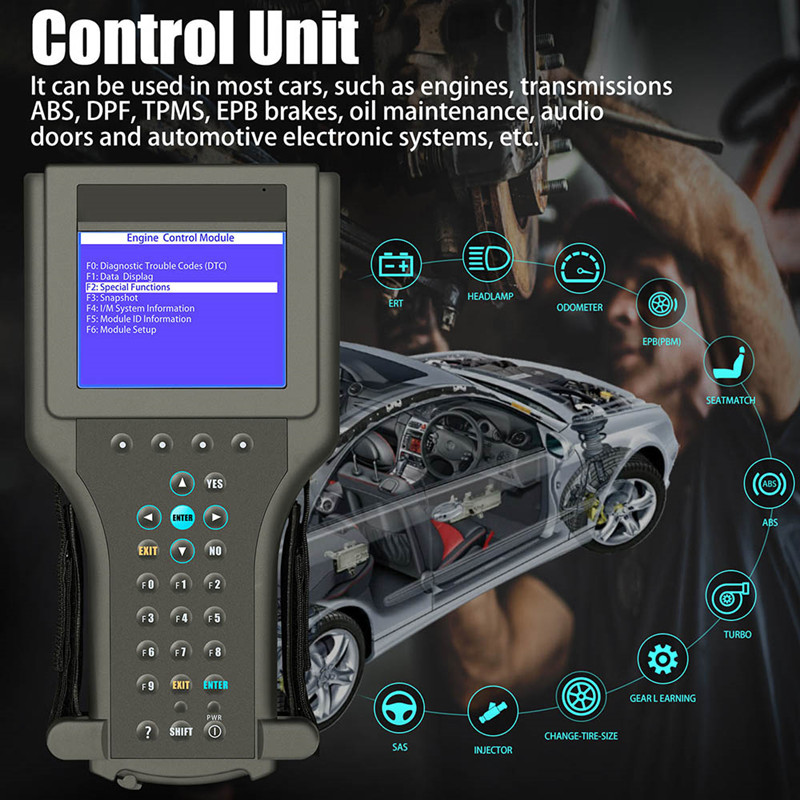
Key Features of GM Tech 2
✔ Vehicle Coverage: Works on Chevy, GMC, Cadillac, Hummer, Pontiac, Saab, and Saturn
✔ Standalone Operation: No PC required (but optional for updates)
✔ Memory Card Support: Some vehicles (e.g., Saab) require a specific card
✔ CANDI Module: Needed for CAN bus vehicles (2006 and newer)
GM Tech2 Compatibility: Will It Work on Your Vehicle?
1. Does GM Tech2 Reset/Relearn VES (Power Steering) on a 2011 C6 Corvette?
✅ Yes! The Tech2 can reset and recalibrate the Variable Effort Steering (VES) system in a C6 Corvette (2005-2013).
You have to select
GM 32MB memory card for this vehicle.
Follow the steering angle sensor (SAS) recalibration procedure in the Tech2 menu.
2. Does GM Tech2 Work on a 2006 Silverado 1500?
✅ Yes! The 2006 Chevy Silverado 1500 uses a Class 2 data bus, which Tech2 supports.
CANDI module is required for full diagnostics (since 2006+ models use CAN bus).
3. Can GM Tech2 Diagnose a 2006 GMC Topkick?
✅ Yes! The Topkick (C4500/C5500) is supported, but:
For engine diagnostics, ensure you have the correct software cartridge (if applicable).
Heavy-duty trucks may require additional modules.
4. Does GM Tech2 Work on Saab Vehicles? (2002 9-3 Viggen & 2011 9-3 Turbo4)
✅ Yes, but a Saab memory card is required!
You can choose different versions of SAAB card according to your car model.
SAAB V148
SAAB 9-3 (9400) 1998-2003
9-3 Sport (9440) 2003-2011
9-5 (9600) 1998-2010
SAAB V44.000
SAAB 900 1990-1998
9000 1988-1998
💡 Pro Tip: If your technician says the Saab card is missing, you can buy it separately from
www.cartooldeal.com .
Do You Need a Memory Card or Subscription?
1. Is a 32MB Memory Card Required?
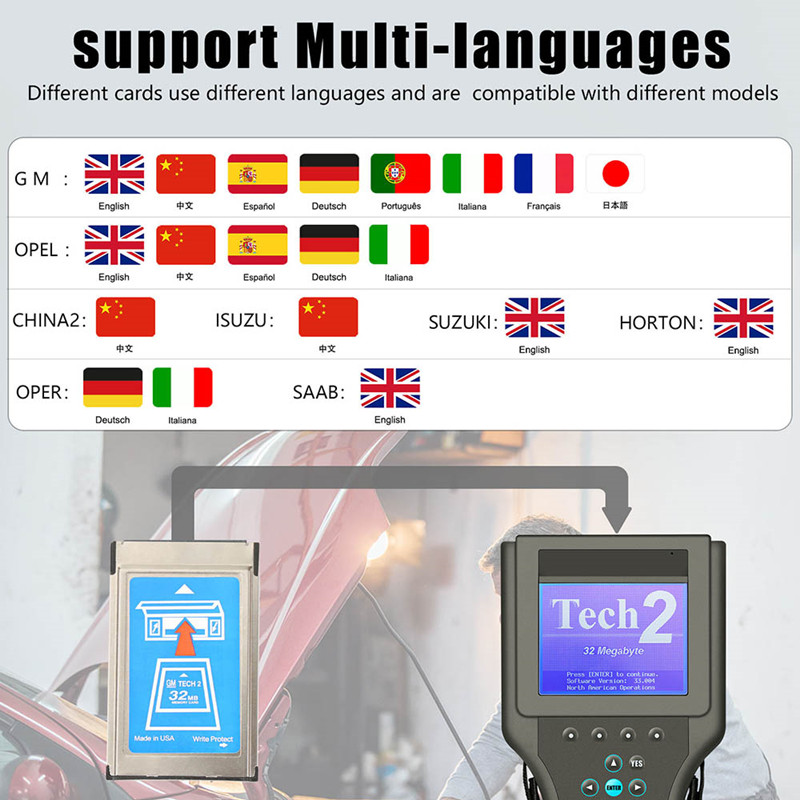
Please note that the GM tech2 itself does not come with the diagnostic software, it come with 2 CDs including TIS2000 software and GM tech2 user manual. The diagnostic software needs to be installed on a 32MB memory card. If you already have a 32MB memory card and the software, you do not need to purchase the card separately. If you do not have one, we recommend that you purchase it together with the card when placing your order. We will install the software on the card and test it with the machine before shipping. This ensures that you receive a working GM diagnostic scanner.
GM TECH2 can support 6 types of models, namely GM, SAAB, OPEL, ISUZU, SUZUKI, North American version of Holden and Australian version of Holden. You can choose different cards according to your model.
Original Tech2 (discontinued by GM) → No subscription.
Aftermarket/clone versions → No recurring fees.
Newer tools (like GDS2/MDI2) require a GM subscription.
Can GM Tech2 Program Lighting & Other Electronics?
✅ Yes! The Tech2 can:
Enable/disable delayed headlights
Adjust DRL (Daytime Running Light) settings
Program key fobs and security systems
⚠ Note: Some lighting customizations depend on the vehicle’s BCM (Body Control Module) programming capabilities.
cartooldeal.com have GM tech2 scanner available on US warehouse. You may order from this website with quality scanner and faster shipping. What's more, if you choose to ship from the United States, you don't have to pay extra customs duties. If you buy this product from other websites, you will have to pay extra customs duties.
Final Verdict: Is GM Tech2 Worth It in 2024?
✅ Best for:
Pre-2013 GM, Saab, and Hummer owners
Mechanics working on older GM models
DIYers needing advanced diagnostics
❌ Not ideal for:
Newer GM vehicles (2014+)
Users unwilling to source memory cards
Conclusion
The GM Tech2 Scanner remains a powerful tool for diagnosing and programming older GM and Saab vehicles. While it doesn’t require a subscription, some models (like Saab 9-3) need a memory card.
If you own a C6 Corvette, Silverado 1500, or Saab, the Tech2 is an excellent investment. For newer vehicles, consider VXDIAG or MDI2.
Ready to buy? Ensure you get the right model with necessary cards!



