Learn how to reprogram a GM PCM using GM Tech 2, MDI, or J2534 tools. Step-by-step guide with troubleshooting tips.
Reprogramming the Powertrain Control Module (PCM) in a GM vehicle can resolve performance issues, update software, or fix error codes. Whether you're using a
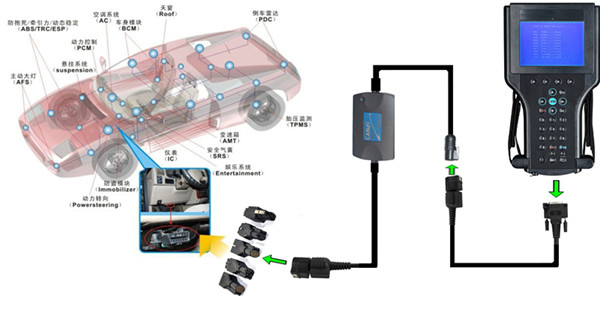
GM Tech 2, GM MDI / GM MDI2 , or J2534 tool, this guide covers the complete process—from preparation to post-reprogramming steps.
Why Reprogram a GM PCM?
✔ Fix engine performance issues (rough idle, stalling)
✔ Resolve transmission shifting problems
✔ Update emissions and fuel efficiency calibrations
✔ Correct factory software bugs (TSB-related updates)
Tools Needed for GM PCM Reprogramming
| Tool |
Purpose |
| GM Tech 2 |
Best for 1996–2013 GM vehicles |
| MDI (Mobile Diagnostic Interface) + GDS2 |
Required for 2010+ models |
| J2534 Pass-Thru Device |
Allows reprogramming via TIS2Web |
| TIS2Web Subscription |
GM’s official software update service |
| Battery Charger/Maintainer |
Prevents power failure during flashing |
(Note: The GM Tech 2 is discontinued—for newer cars, use MDI or a J2534 tool.)
1. Prepare the Vehicle
Connect a battery charger (must stay above 12V).
Turn off all accessories (lights, radio, A/C).
Ensure ignition is ON (engine OFF).
2. Access TIS2Web for Calibration Files Log in to GM’s TIS2Web (Techline Service).
Enter the VIN to find the correct PCM update.
Download the latest calibration file.
3. Connect the Diagnostic Tool For Tech 2:
Plug into the OBD-II port, go to Diagnostics > PCM > Reprogram.
For MDI/J2534: Use GDS2 software and follow on-screen prompts.
4. Flash the PCM
Select "Reprogram PCM" or "Program ECM".
Load the downloaded calibration file.
Do NOT interrupt the process (takes 10–30 minutes).
Wait for "Programming Complete" confirmation.
5. Perform Post-Reprogramming Steps
Cycle the ignition (OFF for 60 sec, then ON).
Relearn Procedures: Idle Relearn (let engine run for 5–10 mins).
Throttle Position Sensor (TPS) Reset (turn key ON for 30 sec, then start).
Crank Position Sensor Relearn (if applicable).
Reprogram GM PCM for 2007 Cadillac CTS
1. Connect the Tech 2 to the Vehicle
Plug the Tech 2 into the OBD-II port (under the dashboard).
Turn the ignition to ON (engine off).
2. Access the PCM Reprogramming Function
On the Tech 2, select:
"Diagnostics"
"2007"
"Cadillac"
"CTS"
"Powertrain"
"Control Modules"
"PCM"
Choose "Reprogram PCM" or "Program ECM" (depending on software version).
3. Check Current Calibration
The Tech 2 will display the current PCM calibration ID.
Compare it with the latest available calibration in TIS2Web.
4. Download the Latest PCM Calibration File
Log in to GM TIS2Web (via Techline Terminal).
Enter the VIN and download the latest PCM calibration file.
Save it to a USB drive or transfer it directly to the Tech 2 (if supported).
5. Begin Reprogramming
Select "Program ECM" or "Reprogram PCM".
Follow the on-screen prompts to load the new calibration file.
Confirm the programming request.
6. Monitor the Process
DO NOT turn off the ignition or disconnect the Tech 2 during programming.
The process may take 10-30 minutes (depending on file size).
Wait for the "Programming Complete" message.
7. Perform a PCM Reset
After programming, the Tech 2 may prompt you to cycle the ignition.
Turn the key OFF for 60 seconds, then back ON.
8. Verify Programming
Go back to "PCM Diagnostics".
Check "PCM Information" to confirm the new calibration ID matches the update.
9. Relearn Procedures
After reprogramming, perform:
Throttle Position Sensor (TPS) Relearn
Turn ignition ON (engine off) for 30 seconds, then start the engine.
Idle Relearn
Let the engine idle for 5-10 minutes (until stabilized).
Crank Position Sensor Relearn (if applicable).
Common GM PCM Reprogramming Issues & Fixes
| Problem |
Solution |
| Programming Failure |
Check battery voltage, retry with stable power |
| "No Communication" Error |
Inspect OBD-II port, check fuses |
| PCM "Bricked" (No Start) |
Try reprogramming again or replace PCM |
| TIS2Web Access Denied |
Ensure a valid Techline subscription |
Alternatives to GM Tech 2 for PCM Reprogramming
Since the Tech 2 is outdated, consider:
MDI + GDS2 (GM’s official tool for newer cars)
J2534 Tools (like DrewTech Mongoose, Tactrix)
Aftermarket Scan Tools (Autel MaxiFlash, Snap-On)
Conclusion
Reprogramming a GM PCM is essential for fixing drivability issues and keeping software up to date. While the Tech 2 works for older models, newer vehicles require GM MDI 2 or GM J2534 tools. Always:
✔ Use a battery maintainer
✔ Follow TIS2Web instructions carefully
✔ Perform relearn procedures after flashing