Can a GM Tech 2 program a 2002 Corvette BCM? Yes, with the CANdi module. Learn the exact RPO setup, VIN programming, and anti-theft relearn procedure.
Quick Answer:
Yes — the GM
Tech 2 Scanner can program and configure the Body Control Module (BCM) on a 2002 Chevrolet Corvette, but only when paired with the CANdi (Controller Area Network diagnostic interface) module. A bare Tech 2 won't talk to the C5 Corvette's Class 2 / CAN network.
To complete a successful BCM replacement on a 2002 Corvette, you'll perform three Tech 2 operations:
1. RPO configuration — write the vehicle's Regular Production Options (fog lamps, tire pressure monitoring, transmission type, etc.) into the new BCM.
2. VIN programming — match the new BCM to the car's VIN.
3. Anti-theft relearn — synchronize the new BCM with the Powertrain Control Module (PCM) using GM's VATS (Vehicle Anti-Theft System) handshake so the engine will crank and start.
For firmware flashing (writing the latest factory calibration to the BCM), the Tech 2 alone is no longer sufficient. You must use it as a pass-through device paired with a laptop running GM's Techline Connect / SPS2 (Service Programming System 2), or use a modern J2534-compliant pass-through tool.
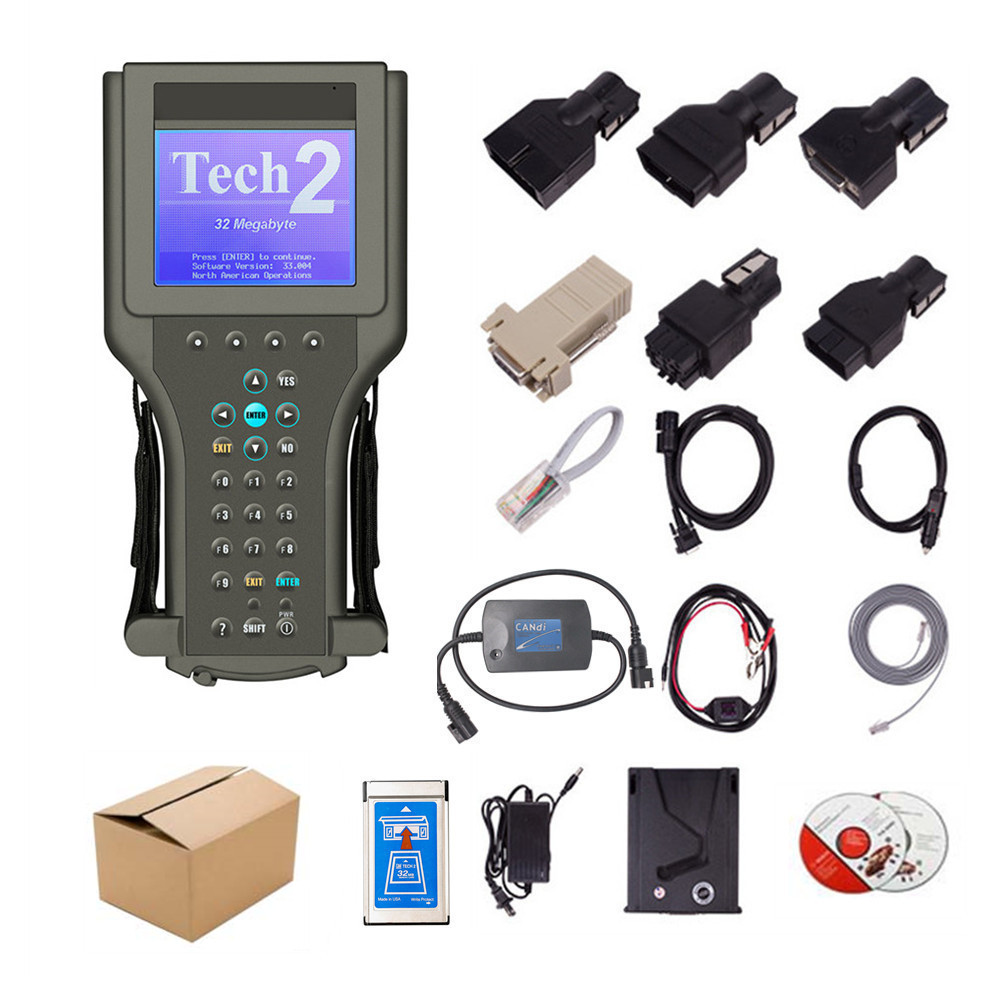
What the GM Tech 2 Scanner Is — and Why the 2002 Corvette Needs It
The Tech 2 is GM's legacy OEM diagnostic scan tool, manufactured by SPX/OTC, that ran on the proprietary 32 MB PCMCIA software card known as TIS2000 / ACDelco TDS. It is the only scan tool certified by General Motors to perform module programming on Class 2 serial data vehicles from the mid-1990s through the early 2000s — including the C5 Corvette (1997–2004).
The 2002 Corvette sits on GM's Y-body platform and uses both Class 2 (UART) at 10.4 kbps and the newer CAN (Controller Area Network) bus at 500 kbps. To bridge the Tech 2 to the vehicle's OBD-II diagnostic link connector (DLC), you need the CANdi module — a small interface box that snaps onto the back of the Tech 2 and translates between the tool's proprietary protocol and the car's network.
Without the CANdi module, the Tech 2 will power up but cannot communicate with the BCM. This is the single most common reason DIYers fail to program a C5 Corvette BCM.
Prerequisites: What You Need Before You Start
Before plugging in the Tech 2, gather the following:
| Item | Why It's Required |
| **GM Tech 2 scan tool** | OEM-grade programming capability |
| **CANdi module** | Translates Tech 2 to the Corvette's CAN bus |
| **TIS2000 software card (v33+)** | Contains BCM programming routines |
| **16-pin OBD-II DLC cable** | Connects to the car's diagnostic port (under the dash, left of the steering column) |
| **Stable 12 V battery voltage ≥ 12.4 V** | Voltage drop mid-programming can brick the BCM |
| **Battery maintainer** (CTEK or similar) | Prevents voltage sag during the 30-minute relearn |
| **Both original keys** | Required for the anti-theft relearn sequence |
| **VIN and RPO list** | Found on the glove-box label or driver's door jamb sticker |
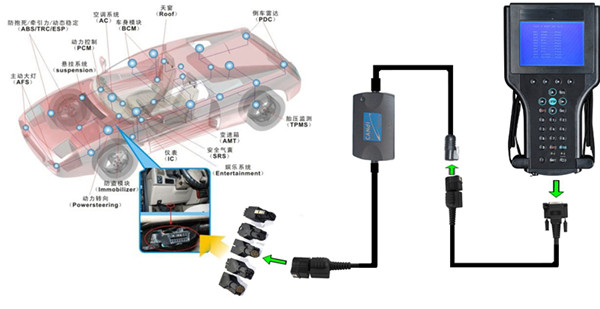
Step-by-Step: Programming the BCM on a 2002 Corvette
Step 1 — Connect the GM Tech 2 Scanner
1. Plug the **CANdi module** into the back of the Tech 2.
2. Connect the **DLC cable** from the CANdi to the Corvette's **OBD-II port**.
3. Turn the ignition to **RUN (do not crank)**.
4. Power on the Tech 2. Select **"2002" → "Passenger Car" → "Chevrolet" → "Corvette"**.
5. Press **F0 — Diagnostic Trouble Codes** to confirm two-way communication. If the Tech 2 reads the BCM, the CANdi is working.
Step 2 — Program the RPOs (Regular Production Options)
The RPO list defines every option on your specific car — fog lamps, traction control, tire pressure monitoring (TPM), automatic vs. manual transmission, sport seats, etc. A new or used BCM is shipped **blank** and will default to one configuration; without RPO programming, features like fog lights, keyless entry, or TPM won't function.
On the Tech 2:
1. Select **Body → Body Control Module → Module Setup → RPO Configuration**.
2. The tool will list every RPO code. Match each one against the **RPO sticker on the driver's door jamb**.
3. Confirm and write to the BCM. The Tech 2 displays **"Programming Complete"** when finished.
> **Common mistake:** Skipping the RPO configuration step. The BCM powers up, the car starts, but certain accessories silently don't work. Always verify RPOs first.
Step 3 — Program the VIN
The VIN must be written to the BCM so it matches the PCM, the instrument cluster, and the immobilizer. On the Tech 2:
1. Navigate to **Body Control Module → Module Setup → VIN Programming**.
2. Enter the **17-digit VIN** from the dashboard or door jamb.
3. Press **Enter** and wait for confirmation.
> **Tip:** If the VIN already in the BCM differs from the car's actual VIN, GM systems will throw a **U1000 / U0100** class network DTC and may prevent starting until the mismatch is resolved.
Step 4 — Perform the Anti-Theft Relearn (BCM ↔ PCM Sync)
This is the most-skipped and most-misunderstood step. The 2002 Corvette uses GM's **Passlock anti-theft system**, which is governed jointly by the BCM and PCM. After replacing the BCM, the two modules have **no shared security handshake**, and the engine will crank but **not start**. The relearn procedure re-establishes trust.
**The official 30-minute relearn:**
1. Insert the **first working key**. Turn the ignition to **RUN** (do not crank).
2. Leave the key on for **11 minutes**. The security light will flash, then stay solid, then go out.
3. Turn the key **OFF** for **30 seconds**.
4. Repeat steps 2–3 for a **second cycle**, then a **third cycle** — total of **three cycles, ~33 minutes**.
5. After the third cycle, start the engine. The security light should remain off and the car should run normally.
6. Repeat the entire sequence with the **second key**.
> **Critical:** Do not open the door, cycle accessories, or disturb the battery during the 30-minute relearn. A voltage drop will reset the BCM and force you to start over.
Firmware Flashing: When the Tech 2 Alone Isn't Enough
If your goal is to **update the BCM's firmware to the latest factory calibration** (called "flashing" or "reprogramming"), a standalone Tech 2 typically **cannot do this on its own** anymore.
Modern GM programming requires a **two-tier setup**:
- **Option A — Tech 2 as pass-through:** Connect the Tech 2 to a **laptop running GM's Techline Connect (SPS2)** software via the RS-232 port. The laptop fetches the latest calibration from GM's servers; the Tech 2 acts as the vehicle-side translator.
- **Option B — Modern J2534 pass-through tool:** Use a **SAE J2534-1/-2 compliant device** such as the **GM MDI, MDI 2, or ACDelco's diagnostic interface** with the same SPS2 software. This is now GM's preferred method and is what dealerships use.
You must have an **active GM Techline Connect subscription** (currently around **$50 per 24-hour access window** or part of a dealer/independent shop account) to download calibrations.
> **For most DIYers replacing a C5 Corvette BCM, flashing is not required.** A used or remanufactured BCM typically already has compatible firmware. Flashing is only necessary when GM has issued a TSB (Technical Service Bulletin) addressing a known BCM defect.
Tech 2 vs. J2534: Which Should You Use?
| Feature | Tech 2 + CANdi | J2534 Pass-Through + SPS2 |
|---|---|---|
| **BCM programming (RPO + VIN)** | ✅ Yes | ✅ Yes |
| **BCM firmware flashing** | ⚠️ Limited, requires laptop | ✅ Full capability |
| **Anti-theft relearn** | ✅ On-tool prompts | ✅ Software-guided |
| **Cost** | ~$300–$600 used | ~$200–$1,500 (MDI 2 is ~$1,500) |
| **Subscription required** | No (TIS2000 once-off) | Yes (Techline Connect) |
| **Internet required** | No | Yes |
| **Best for** | 1997–2004 C5 Corvette work | Modern GM vehicles + firmware updates |
Common Issues & Troubleshooting
| Symptom | Likely Cause | Fix |
|---|---|---|
| Tech 2 won't talk to BCM | Missing CANdi module | Attach CANdi between Tech 2 and DLC |
| Engine cranks but won't start after BCM swap | VATS handshake not learned | Run the 30-minute anti-theft relearn
| Fog lamps / TPM not working after install | RPO not configured | Re-run RPO programming in Tech 2 |
| U0100 / U0140 DTCs after install | VIN mismatch between BCM and PCM | Re-program VIN, then relearn |
| "Programming Error" mid-write | Battery voltage drop | Use a battery maintainer, restart procedure |
Frequently Asked Questions
Q: Do I really need the CANdi module for a 2002 Corvette?
A: Yes. The 2002 Corvette uses CAN-bus communication for the BCM, and the CANdi module is the only Tech 2 accessory that bridges the proprietary Tech 2 protocol to CAN. Without it, the tool cannot establish communication.
Q: How long does BCM programming take on a C5 Corvette?
A: Plan for **60–90 minutes total** — roughly 15 minutes for RPO + VIN setup, plus 33 minutes for the anti-theft relearn cycles.
Q: Can I use a Tech 2 to program a used BCM from a different Corvette?
A: Yes, but you **must** rewrite the RPO codes and VIN to match your specific car, and you **must** perform the anti-theft relearn. Used BCMs from salvage yards work fine once configured.
Q: Will aftermarket BCMs work, or do I need a GM OEM unit?
A: Only **OEM GM / ACDelco BCMs** are programmable with the Tech 2. Aftermarket or unbranded modules from unknown sources typically cannot be flashed or recognized by SPS2.
Q: Can I skip the anti-theft relearn if I'm only swapping a BCM with the same VIN?
A: No. Even when the VIN matches, the security handshake keys between the BCM and PCM are cryptographically unique to each module pairing. The relearn is mandatory.
Q: Is the Tech 2 still supported by GM?
A: As of 2024, GM has officially sunset the Tech 2 in favor of the **GDS2 (Global Diagnostic System 2)** software and **MDI 2** interface. However, for **1997–2004 C5 Corvettes**, the Tech 2 remains the most reliable and widely supported tool because GDS2 has limited coverage on pre-2007 vehicles.
Conclusion
Programming a Body Control Module on a **2002 Corvette** with a **GM Tech 2** is absolutely achievable — but it requires the **CANdi module**, a careful **RPO + VIN configuration**, and the **30-minute anti-theft relearn** to bring the BCM and PCM back into sync.
For most C5 owners doing a BCM swap, the Tech 2 is still the gold standard: it's self-contained, doesn't require an internet subscription for basic programming, and is fully supported across every C5 Corvette model year.
When firmware flashing enters the picture — whether for a TSB fix or to bring a module fully up to current calibration — the Tech 2 transitions from a standalone tool into a **pass-through device** for GM's **Techline Connect / SPS2** software, or you step up to a modern J2534 interface.