
Mercedes Sprinter AdBlue Emulator Installation: Which Fuses to Remove (2015 Guide)
If you own a 2015 Mercedes Sprinter, you are likely familiar with the frustrations that can come with the Selective Catalytic Reduction (SCR) system. While the system is designed to reduce emissions, faults in the AdBlue injection, NOx sensors, or heating elements can lead to dreaded warning lights, reduced engine power, and even limp mode.
For many owners and fleet managers, installing an AdBlue Emulator is the most effective solution to bypass these complex issues. At Cartooldeal.com, we provide high-quality plug-and-play solutions to help you get your vehicle back on the road without the hassle of expensive dealership diagnostics.
A question we get asked frequently by Mercedes Sprinter owners is: "I have the emulator, but which fuses do I need to remove?"
Based on the fuse layout for the 2015 Mercedes Sprinter and standard installation procedures for Mercedes-Benz trucks, this guide will walk you through the exact fuses to pull to ensure your new AdBlue OBD2 Emulator works flawlessly .
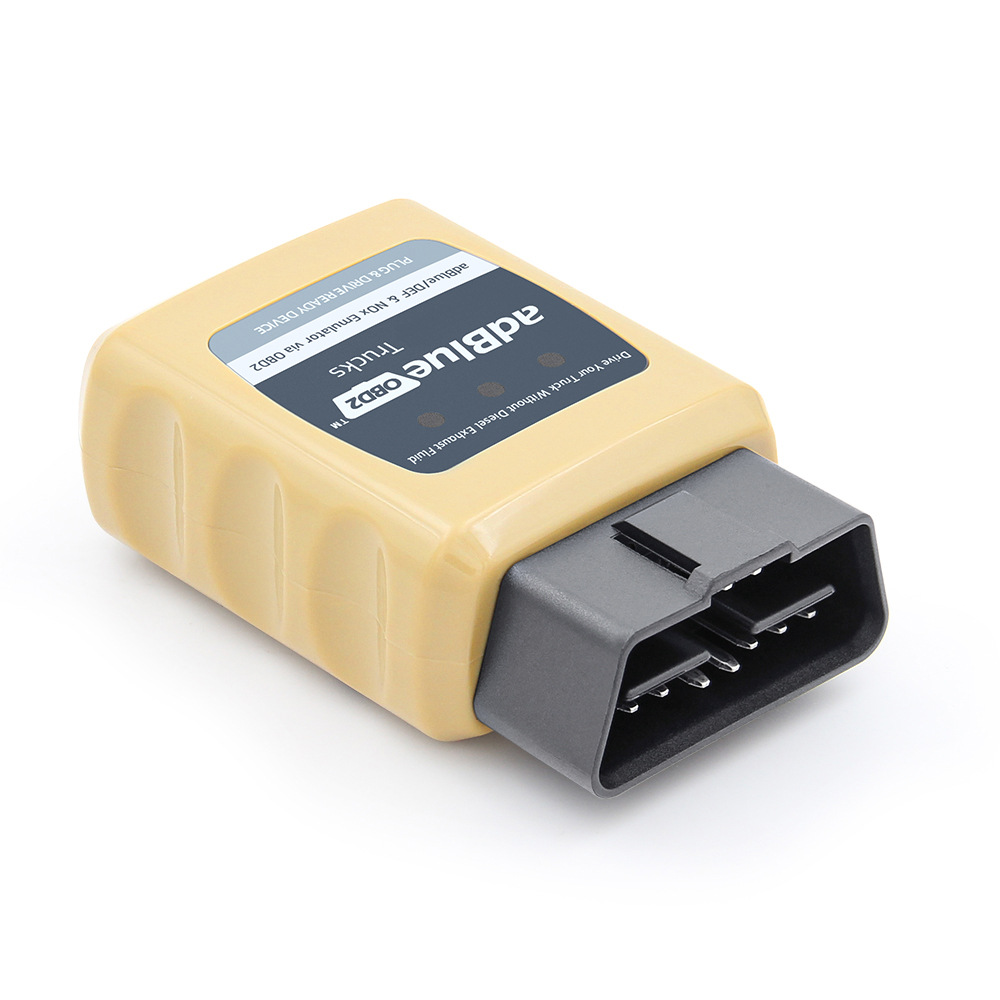
Before we start pulling fuses, it helps to understand what we are dealing with. The 2015 Mercedes Sprinter is equipped with a Diesel Exhaust Aftertreatment system to meet Euro 5/6 emissions standards. This system relies on several key components:
The SCR Control Relay: Manages the overall function of the exhaust treatment.
AdBlue Heating Systems: Multiple heating circuits prevent the AdBlue fluid from freezing in cold temperatures.
The Control Unit: Monitors fluid levels, dosage, and sensor readings.
When this system fails, it often results in warning messages regarding "AdBlue See Owner's Manual" or countdown limiters. An emulator works by overriding the AdBlue system, effectively stopping the usage of the fluid and disabling the NOx sensors to keep the engine management system happy without actually requiring the physical components to work .
According to product specifications for AdBlue OBD2 Emulators designed for Mercedes-Benz trucks, a critical step in the installation process is isolating the vehicle's original control modules .
The instructions typically state: "Remove the fuses mentioned." . This is done for two reasons:
To Cut Power to Factory Components: Removing specific fuses ensures that the factory SCR control relay and AdBlue heating systems are completely disabled. This prevents any voltage feedback or conflict between the original ECU and the new emulator.
To Prevent Error Codes: If the heating systems are left active while the emulator is tricking the NOx sensors, the vehicle might still detect an anomaly and throw a fault light. Pulling the fuses ensures a clean slate.
For the 2015 model year Sprinter, the primary fuse box is typically located in the dashboard, on the driver's side (left-hand drive models) behind a protective cover. You may also find relevant fuses in the pre-fuse box in the engine compartment, but for the SCR system, the dashboard box is the primary target.
Based on your vehicle documentation, here are the specific fuses related to the AdBlue and SCR system:
| Fuse Number | Amperage | Description |
|---|---|---|
| Fuse #32 | 5A | SCR system / Exhaust gas aftertreatment control relay |
| Fuse #34 | 20A | Heating system 1, AdBlue® reducing agent |
| Fuse #35 | 5A | Heating system 2, AdBlue® reducing agent |
| Fuse #36 | 15A | Control and heating system 3, AdBlue® reducing agent |
Now, let's get to the main event. For a Mercedes-Benz truck or Sprinter, the generalized instruction is often to remove a fuse labeled "F1" . However, since the 2015 Sprinter uses a numerical system, we need to translate that.
Based on the description, Fuse #32 controls the SCR system / exhaust gas aftertreatment control relay. This is the brain of the operation. For the emulator to take over control of the AdBlue simulation without interference from the factory relay, Fuse #32 must be removed.
This aligns with the standard Mercedes truck procedure where removing the main SCR fuse allows the aftermarket AdBlue OBD2 emulator to communicate directly with the vehicle's network without the factory module waking up and causing a conflict .
These fuses control the heating elements for the AdBlue tank and lines. Whether you need to remove these depends on your specific vehicle setup and climate, but here is the general rule of thumb:
If you live in a cold climate: The heater circuits will try to activate automatically in low temperatures. If these fuses remain in place while the emulator is installed, the system might still try to draw power, potentially logging a fault for an "open circuit" or "heater malfunction." It is often safer to remove them.
If you want a complete bypass: To ensure the aftertreatment system is 100% disabled without any side effects, it is recommended to remove Fuses #34, #35, and #36 as well.
Summary of Removal:
For a complete and error-free installation on a 2015 Mercedes Sprinter, you should remove Fuse #32, #34, #35, and #36.
Following the industry-standard procedure for Mercedes-Benz vehicles, here is the full workflow to get your AdBlue Emulator running :
Safety First: Ensure the vehicle is completely off. Pull the key out from the ignition and wait for all dashboard lights to go out .
Access the Fuse Box: Open the driver's side dashboard fuse panel.
Remove the Fuses: Using a fuse puller or needle-nose pliers, carefully remove Fuses #32, #34, #35, and #36. Store them in a safe place in case you ever need to revert the vehicle to its original factory settings.
Locate the OBD2 Port: The OBD2 diagnostic port is typically located under the dashboard on the driver's side, near the steering column.
Plug in the Emulator: Take your AdBlue OBD2 Emulator from Cartooldeal.com and firmly plug it into the OBD2 connector . It is designed to fit the specific pin layout of Mercedes-Benz vehicles.
Test the System: Turn on the ignition (do not start the engine yet). Observe the instrument cluster.
Clear Codes (If Necessary): In some instances, if the vehicle had existing faults before installation, the warning light might remain illuminated. The instructions note that if a fault light appears, you may need to delete it using a service scanner . Once cleared with the emulator in place, the light should not return.
Once you have successfully removed the correct fuses and installed the emulator, you can expect the following benefits :
No More AdBlue Top-Ups: The system is overridden, so you no longer need to purchase expensive AdBlue fluid.
No Power Loss: The emulator ensures the engine ECU does not derate power, so you maintain full performance .
Dashboard Warnings Gone: It stops the "Check AdBlue" warnings and countdown limiters .
Non-Damaging: This is a plug-and-play device. It does not damage the engine or permanently alter the factory ECU settings .
Reversible: If you ever need to return to stock for servicing or resale, simply unplug the emulator and replace the fuses .
Q: Will this work on my Euro 6 Mercedes Sprinter?
A: Yes. AdBlue OBD2 Emulators are designed to work with vehicles equipped with EURO 4, 5, and 6 catalytic converter systems .
Q: What if I only remove Fuse #32 and leave the heater fuses?
A: You might be fine, especially in warmer weather. However, if the system performs a self-check on the heating circuits, it could log a fault. Removing all four ensures a 100% stable environment for the emulator.
Q: I removed the fuses and plugged in the emulator, but the AdBlue warning is still on. What do I do?
A: First, try clearing the fault codes with an OBD2 scanner. The emulator prevents new faults, but it does not erase old ones stored in the memory . If the light persists after clearing, check that the emulator is fully seated in the OBD2 port.
Installing an AdBlue Emulator on your 2015 Mercedes Sprinter is a straightforward process that saves you time and money. The key to a successful installation lies in the preparation: specifically, removing the correct fuses to disable the factory SCR and heating components.
By removing Fuses #32, #34, #35, and #36, you ensure that your new Cartooldeal.com AdBlue Emulator can take full control, providing a reliable, long-term fix for problematic AdBlue systems.
Ready to solve your AdBlue issues for good? Browse our selection of Mercedes-Benz AdBlue Emulators today and enjoy hassle-free driving.


